Automated Weekly Analytics Performance Report
analytics
Verified
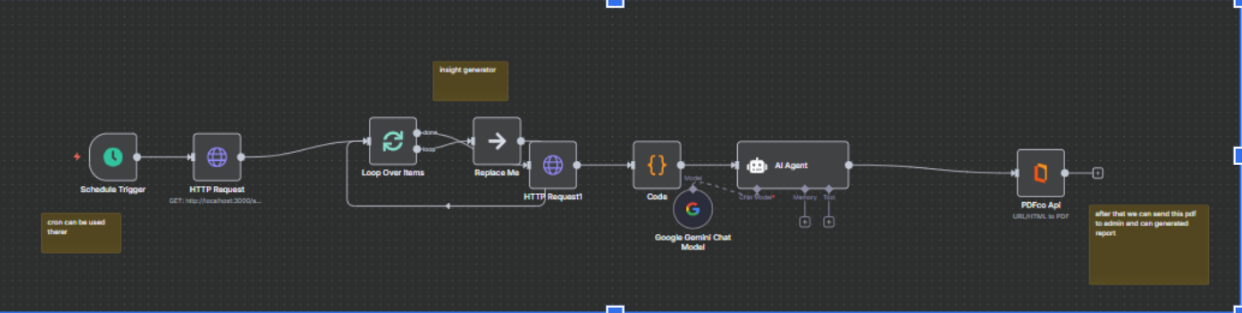
reporting automationGenerate and send automated weekly performance reports to stakeholders.
Overview
<section class="automation-detail">
<header>
<h1>Google Analytics Reporting Automation – Scheduled Traffic & Conversion Reports</h1>
<p>
Automate your <strong>Google Analytics reporting</strong> and receive scheduled summaries of your
website performance without manually logging into dashboards. This automation pulls key metrics
from your analytics account and delivers them directly to your inbox, Slack workspace, or Google Sheets.
</p>
</header>
<section>
<h2>What This Automation Does</h2>
<p>
This <strong>Google Analytics automation workflow</strong> collects your most important website
performance metrics and generates easy-to-read summaries on a daily, weekly, or monthly schedule.
Instead of manually checking analytics dashboards, you get clear reports that help you track
traffic growth, campaign performance, and conversions automatically.
</p>
<p>
The system connects securely with your analytics account, extracts real-time performance data,
and formats it into structured reports that can be shared with marketing teams, founders, or
clients.
</p>
</section>
<section>
<h2>Key Metrics Included in Reports</h2>
<p>
Each automated report includes essential metrics that help you understand how your website
and marketing campaigns are performing.
</p>
<ul>
<li>
<strong>Website Traffic:</strong> Track total visitors, new users, and traffic trends
across different time periods.
</li>
<li>
<strong>Conversion Rate:</strong> Monitor how effectively your website converts visitors
into leads, signups, or customers.
</li>
<li>
<strong>Top Performing Pages:</strong> Identify which pages generate the most traffic,
engagement, and conversions.
</li>
<li>
<strong>Campaign Performance:</strong> Analyze marketing campaigns, referral sources,
and traffic channels driving results.
</li>
</ul>
</section>
<section>
<h2>Delivery Options</h2>
<p>
Reports can be delivered automatically through multiple channels depending on your workflow
and team collaboration tools.
</p>
<ul>
<li>
<strong>Email Reports:</strong> Receive beautifully formatted analytics summaries directly
in your inbox.
</li>
<li>
<strong>Slack Notifications:</strong> Send automated performance updates to your marketing
or analytics Slack channels.
</li>
<li>
<strong>Google Sheets Dashboard:</strong> Export and store analytics data in Google Sheets
for deeper analysis and team sharing.
</li>
</ul>
</section>
<section>
<h2>Benefits of Automating Google Analytics Reports</h2>
<ul>
<li>Save hours spent manually checking analytics dashboards</li>
<li>Get real-time performance insights automatically</li>
<li>Share data easily with marketing teams and stakeholders</li>
<li>Track campaign performance without technical setup</li>
<li>Build automated reporting workflows for clients or agencies</li>
</ul>
<p>
Whether you are a <strong>startup founder, marketing team, or SEO specialist</strong>,
automated analytics reporting ensures that important data is delivered consistently
without manual effort.
</p>
</section>
<section>
<h2>Use Cases</h2>
<ul>
<li>Weekly marketing performance reports</li>
<li>Automated SEO traffic monitoring</li>
<li>Campaign performance summaries</li>
<li>Client reporting for marketing agencies</li>
<li>Startup growth tracking dashboards</li>
</ul>
</section>
</section>
Capabilities
Google AnalyticsReportingData Automation
Last updated: