Props Drilling vs Context API in React: When and How to Use Each Effectively

Learn the differences between props drilling and Context API in React. Understand when to use each approach for state management, with practical examples and best practices for building scalable React applications.
Prerequisites
- Basic React knowledge
- Understanding of hooks
- ES6+ JavaScript
- Props drilling and Context API concepts
1. Why Props and Context API Matter for Better understanding of React
Let me start with something honest and real use case.
every one understands how react works externally but when it comes to show your knowledge in interview or real world project most of the developers fails to show their expertise in designing reusable components through props and react context API.
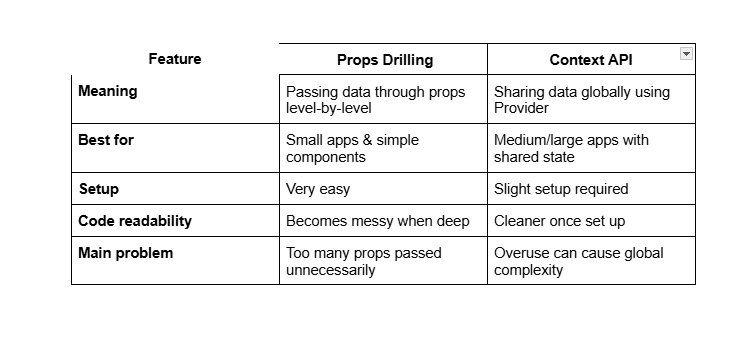
Imagine scenario in interview where you you need to create an appication with compoent reasuability and you are asked how you will pass data to each component respectivesly and how you will manage state across the application. These are the most common question asked in react interviews. In this tutorial I will share you some practical tips and best practices on how to design reusable react components using props and context API. I will share some inerview scenarios as well so that you can easily crack your next react interview. By the end of this totorial you will clear understanding of:
- React props drilling and Context API
- When to use each approach effectively
- Best practices for scalable React applications
- How to avoid common pitfalls in component design
Here is the example of of Props drilling in React:
function App() {
const user = "Akshey";
return Welcome, {user}
;
}
what actually happening in this code:
Dashboard and Sidebar to reach Profile.App → Dashboard → Sidebar → ProfileReact components with Props drilling becomes harder to maintain and effect developer experience. Props drilling is a common issue in React applications where data is passed down through multiple levels of components, even when intermediate components don't use the data themselves.
Here is the example of of Props drilling in React:
      import { createContext } from "react";

      export const UserContext = createContext();
UserContext to hold the user data.
      import { UserContext } from "./UserContext";
      function App() {
      const user = "Akshey";

      return (


      );
    }
Here, we use the UserContext.Provider to make the user data available to all components within the App.
import { useContext } from "react";
import { UserContext } from "./UserContext";
function Profile() {
const user = useContext(UserContext);
return Welcome, {user}
;
}
In the Profile component, we use the useContext hook to access the user data directly from the context, eliminating the need for props drilling.
By using the Context API, we simplify data flow and improve code maintainability. Components can access shared data directly from context without passing props through multiple layers.
2. What are Props in react?
Props (short for "properties") are a way to pass data from a parent component to child component in React application. Props can be any type of data, including strings, numbers, objects, functions, and even other components. Props are read-only, meaning that a child components cannot modify the props values it receives from its parent components.
You build a component with hardcoded values:
- Hardcoded text
- Fixed styles
- Logic mixed with UI
- Only one use case in mind
It will works for most of static pages but it is not resuable and does not communicate with other components. For example: if you create a profile card component for an admin user: previously it looks like this:
      function ProfileCard() {
        return (
          <div>
            <h2>Admin User</h2>
            <p>Access granted</p>
          </div>
        );
      }
This component is not reusable because it assumes too much about its usage. 1. It only works for an admin user. 2. It only works for a user with access granted. 3. It only works for a user with a specific name. 4. It only works for a user with a specific role. 5. It cannot be used for other types of users or scenarios. 6. If you need to show a different user, you have to create a new component or modify the existing one. 7. If you need to change the access level, you have to create a new component or modify the existing one. 8. If you need to change the layout or styles, you have to create a new component or modify the existing one. 9. If you need to change the content, you have to create a new component or modify the existing one. 10. This leads to code duplication and maintenance headaches. 11. Reusable components should avoid these pitfalls by being flexible and configurable.
Here is an example of a reusable component:
      function ProfileCard({ user }) {
        return (
          <div>
            <h2>{user.name}</h2>
            <p>Access granted</p>
          </div>
        );
      }
This component is reusable because it does not assume too much about its usage. 1. It can work for any user object passed as a prop. 2. It can work for any access level passed as a prop. 3. It can work for any layout or styles passed as props. 4. It can work for any content passed as props. 5. It can be used for different types of users or scenarios. 6. If you need to show a different user, you just pass a different user object as a prop. 7. If you need to change the access level, you just pass a different access level as a prop. 8. If you need to change the layout or styles, you just pass different layout or styles as props. 9. If you need to change the content, you just pass different content as props.
This avoids code duplication and makes maintenance easier. 10. Reusable components should focus on what changes (data, behavior) and leave the rest (structure, styles) to be configured externally. 11. This way, you can create flexible and adaptable components that can be used in various contexts without modification.
      function ProfileCard() {
        return (
          <div>
            <h2>Admin User</h2>
            <p>Access granted</p>
          </div>
        );
      }
Later, when you need the same component with different data, you copy-paste it. Now you have duplicates.
Reusable components avoid this by not assuming too much.
3. What is Props Drilling?
Props drilling is the process of passing data from a parent component to a deeply nested child component through multiple layers of intermediate components. This can lead to code that is hard to read and maintain, as each intermediate component must explicitly pass the props down to its children, even if it doesn't use them itself.
A well-designed component is like a pure function:
- It takes inputs
- It returns an output
- It does one job clearly
For example, a Greeting component that takes a name prop and returns a greeting message:
      function Greeting({ name }) {
        return <h1>Hello, {name}!</h1>;
      }
- For well designed components props are the inputs
- For well designed components the output is the UI
      function Greeting({ name }) {
        return <h1>Hello, {name}!</h1>;
      }
This component is reusable because it does not assume anything about where the name comes from. It could be hardcoded, fetched from an API, or passed down from a parent component.
4. Problems with Props Drilling
For first few levels of development, and small components and projcts props are fine and prop drilling is manageble but as the application grows in size and complexity, prop drilling can lead to several problems:
- Boilerplate Code: Each intermediate component must explicitly pass down props, leading to repetitive code.
- Tight Coupling: Intermediate components become tightly coupled to the data structure, making changes difficult.
- Reduced Readability: It becomes hard to trace where data is coming from and how it's being used.
- Maintenance Challenges: Adding or removing props requires changes in multiple components.
To avoid these issues with props and unmanageable props drilling, consider these best practices for designing reusable components:
For big projects, props drilling can become unmanageable. Consider using Context API or state management libraries like Redux or Zustand for complex data flows.
5. What is Context API?
Context API is a React feature that allows you to share data across multiple components without having to pass props down manually at every level.
When a component handles everything at once—data, logic, and UI—it becomes hard to reuse. Context API helps you to create cleaner separations of global state. When a project big enough and managing state via props becomes difficult, Context API can help you share data without prop drilling.
A well-designed Global State using Context API separates concerns:
      // Logic
      const UserContext = createContext();

      function UserProvider({ children }) {
        const [user, setUser] = useState(null);
        return (
          <UserContext.Provider value={{ user, setUser }}>
            {children}
          </UserContext.Provider>
        );
      }
Here, the UserProvider component manages user state and provides it to any nested components.
Here is an example of how to use Context API in a React application:
      import { useContext } from "react";
      import { UserContext } from "./UserContext";
      function Profile() {
      const { user } = useContext(UserContext);
      return <h2>Welcome, {user.name}</h2>;
    }
In the Profile component, we use the useContext hook to access the user data directly from the context, eliminating the need for props drilling.
6. Example with Context API
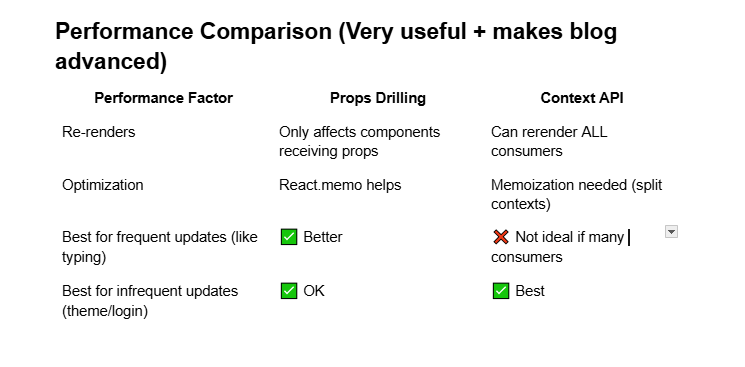
Here is an example of a reusable component using Context API: Lets say you have a component that displays user information, and you want to make it reusable across different components. we have a UserContext that provides user data to any component that needs it.
Steps to solve the problem with context API:
1. Create component
      function UserCard({ user }) {
        return (
          <div className="border p-4">
            <h2>{user.name}</h2>
          </div>
        );
      }
2. Identify project-specific assumptions
The component assumes it will always receive a user object with a name property.3. Refactor to remove assumptions
      function UserCard({ children }) {
        return <div className="border p-4">{children}</div>;
      }
      function App() {
        const adminUser = { name: "Admin User" };
        const guestUser = { name: "Guest User" };
        return (
          <div>
            <UserCard>{adminUser.name}</UserCard>
            <UserCard>{guestUser.name}</UserCard>
          </div>
        );
      }
5. Avoid project-specific assumptions
The refactoredUserCard component no longer assumes anything about the user data. It simply renders whatever children are passed to it, making it reusable for any content.
7. When to Use Props Drilling vs Context API
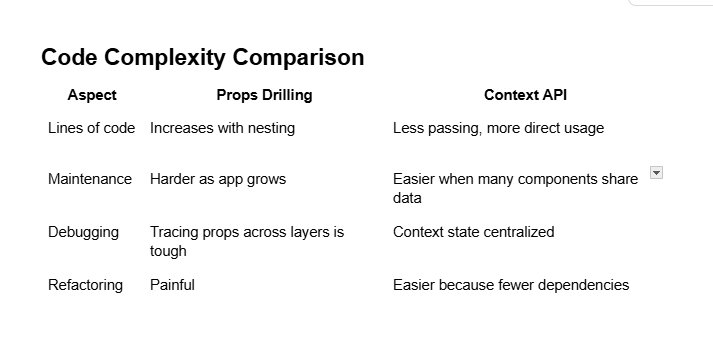
Use props drilling for simple, one-off data passing between closely related components. It keeps components explicit and easy to understand.
Use Context API for global state or data that needs to be accessed by many components at different levels of the component tree. It reduces boilerplate and improves maintainability.
8. Conclusion
In this tutorial, we explored the concepts of props drilling and Context API in React. We discussed the problems associated with props drilling and how Context API can help manage global state more effectively. By following best practices for designing reusable components, you can create scalable and maintainable React applications.
Remember to choose the right tool for the job: use props drilling for simple data passing and Context API for complex state management. Happy coding!